
TinyMCE is a good wysiwyg text editor which you can on your site by free. It is also used as additional module on some CMS like drupal. However (bacause of security problem) this wysiwyg editor lack of iframe button. You also can't insert iframe code, even you insert in html area. TinyMCE will remove any iframe code on your editor. Don't worry, by default TinyMCE doesn't allow iframe but it still support iframe. You just need add some code on your site.
Using Custom Website
Go to file where you add tinyMCE.init Usually it's located on the file that contain text editor. I am sure you know about this. Except you're new webmaster :)
Add the following code on tinyMCE.init
extended_valid_elements : "iframe[src|width|height|name|align|frameborder]",
Restart you website and try to insert iframe code like youtube, etc and see the result
Using Drupal
The easiest way to enable iframe on TinyMCE wysiwyg drupal is by install WYSIWYG IFrames module.
- Go to Modules > Install New Modules then install WYSIWYG IFrames module online or by uploading file if you have downloaded before. Please choose .ta.giz format
- Active the modules
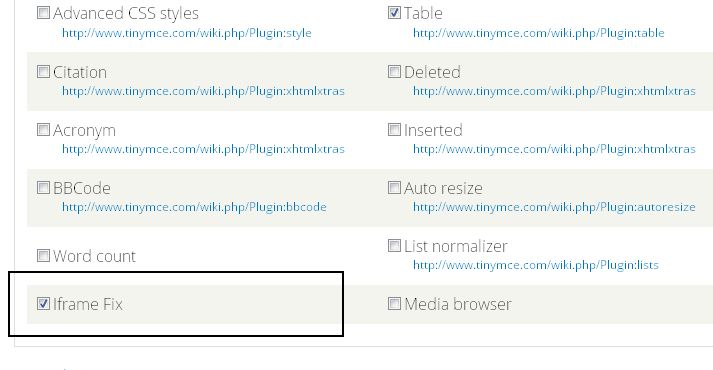
- Don't forget go to Configuration > Content Authoring > WYSIWYG Profile > Edit profile > Buttons and Plugins > Check Iframe Fix
- Try to insert iframe when using wyiswyg editor on edit or add new content.
Now you should be able to post iframe using TinyMCE wysiwyg editor. Please note that iframes can be a security blackhole, so only expose this option to user's that need it.